Video Effects SDK
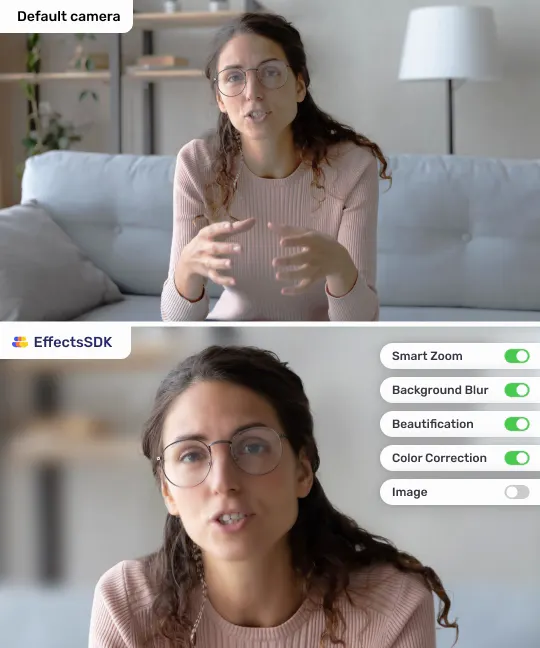
Make every webcam look professional, in real time and on device.
- Virtual background, blur and replacement
- Auto-framing (Smart Zoom)
- Beautification and low-light fix
- AI color correction and LUT filters
npm i effects-sdk
Virtual background, blur, auto-framing and beautification for cameras. Noise and room echo removal, Studio Sound and voice changing for microphones. On-device on web, iOS, Android, Windows and macOS.
Free trial · Integration help from our team
Runs on
Works with
Use them together or on their own, with the same API style on every platform.
Make every webcam look professional, in real time and on device.
npm i effects-sdk
Clear voice for calls, streams, recordings and AI voice agents.
npm i audio-effects-sdk
Every demo runs the production SDK on your own camera or microphone, right in the browser.
Install from npm, pass your Customer ID, hand the SDK a camera or microphone stream and play the processed one.
import { tsvb } from 'effects-sdk';

const sdk = new tsvb('YOUR_CUSTOMER_ID');
sdk.preload();

sdk.onReady = () => {
  sdk.useStream(cameraStream);
  sdk.run();
  sdk.setBlur(0.6);
  video.srcObject = sdk.getStream();
};
import { atsvb } from 'audio-effects-sdk';
const sdk = new atsvb('YOUR_CUSTOMER_ID');
sdk.preload();
sdk.onReady = () => {
sdk.useStream(micStream);
sdk.run();
audio.srcObject = sdk.getStream();
};Same plans for Video and Audio SDK. One session is one SDK initialization, however long it lasts and however many effects run.
$0
7 days with every feature on your platforms. Start in the Developer Portal, no sales call.
from $50
Pay as you go by sessions, with automatic tracking and card payment. Price depends on volume, platforms and features.
Custom
The lowest session price, a 1-month trial, on-premises deployment and an account manager.
Something else? Ask us below.
Sign up in the Developer Portal and start a trial yourself: you get a Customer ID right away, then install the SDK from npm or download the native package for your platform.
It depends on the frame size and format, the inference backend (GPU or CPU), the hardware and what else your app processes. On a typical laptop the Video SDK processes Full HD video at up to 50 FPS.
Frames are processed on the GPU: DirectX 11 on Windows, Metal on macOS and iOS, WebGPU or WebGL in browsers, with a CPU fallback. On iOS and macOS you can pass a CVPixelBuffer directly; a Metal-compatible buffer avoids extra copies. If you need another GPU input path, contact us.
Each release is published with release notes on the Release notes page and on GitHub. Web SDKs are on npm (effects-sdk and audio-effects-sdk); native SDKs ship as packages for each platform. Model files are versioned, so clients on the previous version keep working while you upgrade.
Yes. We help your developers choose the best integration path for your stack and answer questions as you go. Usually we open a shared chat with your team for quick answers. If you have no developer for the integration, we can do it for a fixed price.
Yes. We adapt the SDK to your requirements, usually on a time-and-materials basis.
Yes. Recent releases added video noise suppression, portrait lighting, avatars, custom lower thirds and captions, and Studio Sound in the Audio SDK. Follow the release notes and tell us which features you need next.
Tell us about your product and platforms. Our team will get back to you and can help with the integration.
Ready to build? Open the Developer Portal and start a free trial.