Virtual background SDK
Blur, replace or remove the webcam background in real time, on the user's device.
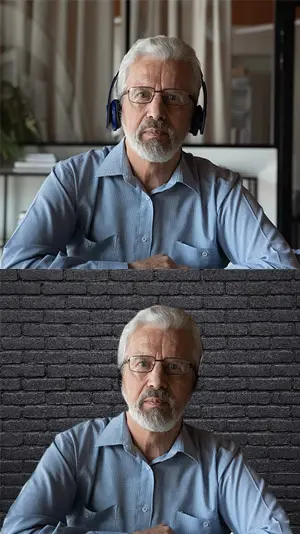
Three background effects, one segmentation model
The model is optimized for real conditions: simple webcams, poor lighting and cluttered rooms. It keeps hair and hands and does not flicker.
- Background blur with power adjustable at runtime
- Background replacement with an image, a video or a screen capture
- Background removal: a transparent frame or a segmentation mask for your own post-processing
Real segmentation examples
Available on Windows, macOS, iOS, Android and the web.









Use cases
Users expect it: Zoom, Google Meet and Microsoft Teams all ship background effects.
Hide a messy room or private details at home
Branded backgrounds with a logo or a QR code for webinars and sales calls
Green-screen-free compositing for streaming and recording tools
Keep the focus on the speaker in telehealth and online classes
Side-by-side comparisons
The same webcam footage processed by other products and by Effects SDK.
Ships in the Video Effects SDK
Available on Web, iOS, Android, Windows, macOS, Electron and Flutter. Start a free trial in the Developer Portal to get a Customer ID and try it in your app.
- Web
- iOS
- Android
- Windows
- macOS
- Electron
- Flutter
Questions about Virtual background & blur?
Tell us about your product and platforms. Our team will get back to you and can help with the integration.
Ready to build? Open the Developer Portal and start a free trial.