Add 15+ video effects to your browser meeting app in hours
The Web Video Effects SDK brings virtual backgrounds, blur, auto-framing and beautification to any WebRTC app. Processing runs in the user's browser.
- Save money on development and support
- Enhance paid plans to boost sales
- Offer effects as individual add-ons
- Give them to all users to improve retention
- A news hook for promotion
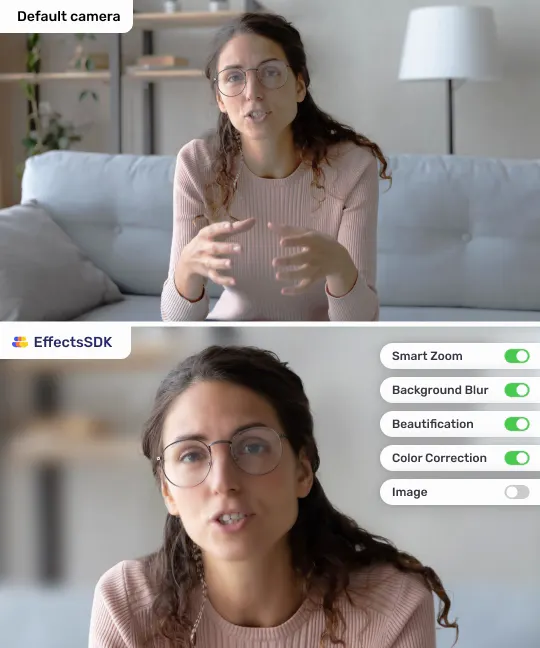
Features your users ask for
Because Zoom, Meet and Teams already have them.
Background blur
Virtual backgrounds
Auto-framing
Beautification
Color correction & LUT filters
Low light & sharpness
Lower thirds & layouts
Portrait lighting
Overlays & stickers
3D head avatars
Simple and quick integration
Over 60 integrations on web, mobile and desktop so far. On the web the fastest took 2 hours; the average is 2–3 days.
- Works with WebRTC out of the box: MediaStream in, MediaStream out
- All current browsers; WebGPU, WebGL and WASM backends
- Ready samples for LiveKit, Zoom Video SDK, Cloudflare Calls, Electron and Flutter
- Our own ML models, developed in-house
import { tsvb } from 'effects-sdk';

const sdk = new tsvb('YOUR_CUSTOMER_ID');
sdk.preload();

sdk.onReady = () => {
  sdk.useStream(cameraStream);
  sdk.run();
  sdk.setBlur(0.6);
  video.srcObject = sdk.getStream();
};
Session-based pricing
Launch features in hours, get regular updates with optimizations and new effects.
Free trial
$0
7 days with every feature on your platforms. Start in the Developer Portal, no sales call.
Startup
from $50
Pay as you go by sessions, with automatic tracking and card payment. Price depends on volume, platforms and features.
Enterprise
Custom
The lowest session price, a 1-month trial, on-premises deployment and an account manager.
Questions
Native apps too? See the Video Effects SDK for iOS, Android, Windows and macOS.
What is an SDK session?
A session is one initialization of the SDK; usage time is not tracked. In a one-to-one call where both participants use a background effect, that is 2 sessions. Once initialized, every feature of the SDK is available.
Is there a demo?
Yes: the live web demo runs the SDK on your own webcam. Our Chrome extension, AI Webcam Effects, is built on the same SDK and works with most meeting platforms without any integration.
We have no developer for the integration. Can you help?
Yes. Our developers can do the integration for a fixed price. Register in the Developer Portal and tell us that you need integration help.
How does it compare with open-source options?
Most customers move to us from Google MediaPipe or ML Kit for better segmentation (no flicker, better shape, works with hands), 15+ ready effects and direct developer support.
Can you customize the SDK?
Yes. We adapt the SDK to your requirements, usually on a time-and-materials basis.
How are updates delivered?
New versions are published to npm and announced by email. Updates are almost always backward compatible: bump the package version. New features may need UI controls in your app.
Still have questions?
Tell us about your product and platforms. Our team will get back to you and can help with the integration.
Ready to build? Open the Developer Portal and start a free trial.